


I've been using AI coding assistants a lot this past year, and one thing keeps bugging me: reviewing the diffs. The AI spits out a bunch of changes, I read through them, I have thoughts, but there's no clean way to write those thoughts down and send them back.
So I built review.nvim. It's a Neovim plugin that lets you annotate code diffs with typed review comments, then export everything as markdown you can paste into Claude Code, Codex, whatever. Built on codediff.nvim, inspired by tuicr.
The problem
When an AI generates a big changeset, I want to go through it properly. Mark lines with notes, suggest alternatives, flag problems, sometimes acknowledge something well done. Then I want all of that as a structured document I can hand back to the AI so it addresses every point.
GitHub PR reviews are built for teams, not for this. I wanted something I could do entirely in my editor, from the keyboard.
How it works
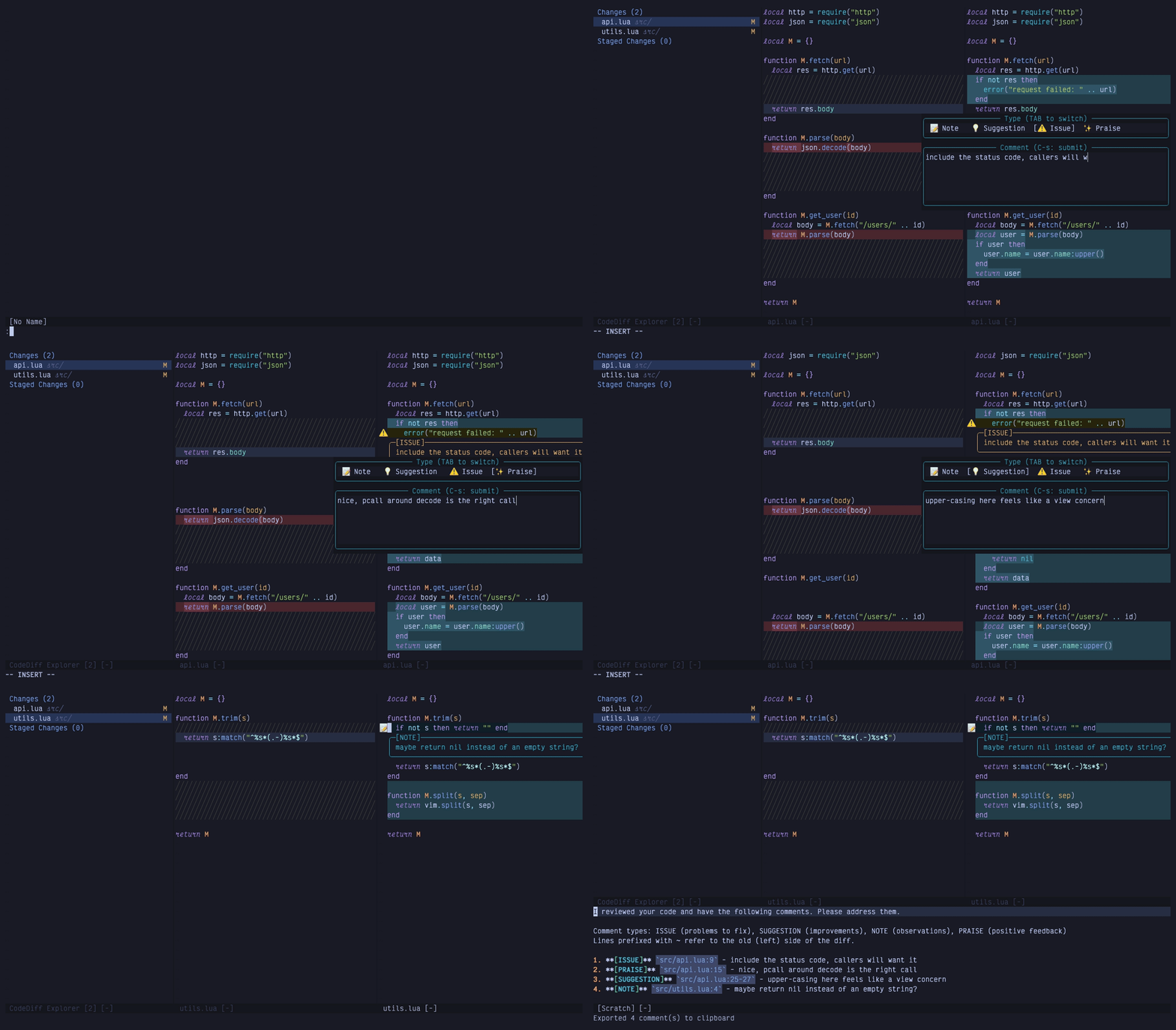
:Review opens a side-by-side diff of your working tree. Tab and Shift-Tab move between files, t toggles side-by-side vs inline, ]n and [n jump between comments.
Press i on a line, pick a comment type from the menu, write your annotation. It shows up as a box below the line with a sign in the gutter. Select a range first if you want a multi-line comment. F for file-level comments.
There are four comment types: note (observations), suggestion (a different approach), issue (needs fixing), and praise (good work, yes, even for the AI). Each gets its own icon and highlight color so you can scan a file quickly.
Comments are side-aware. Left-side (old) comments only show on the left, right-side (new) on the right. The export uses ~ notation for old-side references so the AI knows you're pointing at the previous version, not the current one.
Commits and branches
:Review commits opens a picker where you select a contiguous range. Space sets the start, space again on another commit extends it. Or skip the picker: :Review commits abc123 reviews a single commit against its parent, :Review commits REV1 REV2 for an explicit range.
:Review branch is the one I use before opening a PR. It lists branches with the one you're on first. Pick it and you get the merge base against your working tree, so uncommitted work counts. Pick someone else's branch (say origin/feature-x) and it diffs the commits without checking anything out. The base is main or master unless you say otherwise.
Notes on any file
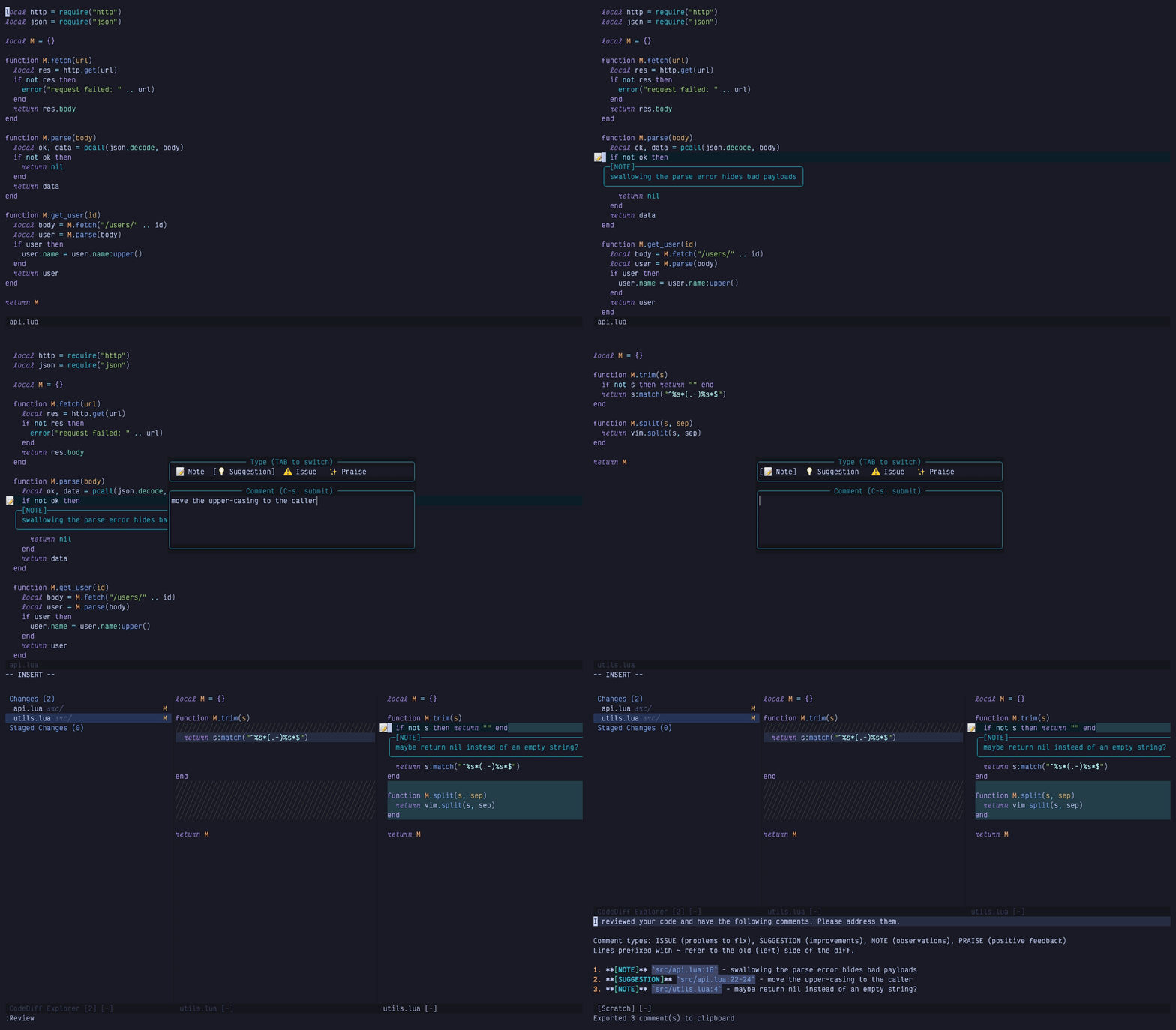
This came from a GitHub issue and it's changed how I use the plugin. You don't need a diff open. :Review note on any line of any file in the repo opens the same popup. Select a range and it's a range note. The notes render in the buffer while you browse, follow your edits when you save, show up on the diff if you open a review later, and come out in the same export as everything else.
I used to leave TODO comments in the code and grep for them afterwards. Now the notes live outside the code and go straight into the export.
The export
This is the part I care about most. Press C and your comments are on the clipboard as markdown, with a preview:
1. **[ISSUE]** `src/api.ts:23` - This endpoint doesn't handle errors
2. **[SUGGESTION]** `src/utils.ts:~10` - The old implementation was cleaner
3. **[PRAISE]** `src/hooks/useAuth.ts:12-18` - Clean implementation of the auth flow
~ means old side. 12-18 is a line range. Paste it into your AI assistant and it has everything it needs to go fix things.
If the clipboard isn't where you want it, export.on_export is a callback that gets the markdown and the comment list on every export. A few lines send it to a tmux pane, a file an agent watches, or Avante. If you use sidekick.nvim, S sends it straight into the chat.
Where comments live
One store per repository, under Neovim's data dir. Comments survive restarts, so a half-done review is still there tomorrow.
Press q when you're done. It exports, moves the comments to an archive folder and closes the review. The next one starts empty. I got tired of clearing comments by hand, but I also didn't want a single key throwing work away, so the archives stay for 30 days. If you switch branches with comments still around, you get a warning when you open the next review.
Setup
{
  "georgeguimaraes/review.nvim",
  version = "*",
  dependencies = {
    "esmuellert/codediff.nvim",
    "MunifTanjim/nui.nvim",
  },
  event = "VeryLazy",
  keys = {
    { "<leader>rr", "<cmd>Review<cr>", desc = "Review working tree" },
    { "<leader>rc", "<cmd>Review commits<cr>", desc = "Review commits" },
    { "<leader>rb", "<cmd>Review branch<cr>", desc = "Review branch" },
    { "<leader>rn", ":Review note<cr>", mode = { "n", "v" }, desc = "Review: note here" },
  },
  opts = {},
}
:checkhealth review tells you if codediff, nui or git are missing. It also checks the codediff functions the plugin calls, because codediff has changed its API twice this year and I'd rather you find out from a health check than from a Lua error.
The loop
So that's how I work with it now. The AI writes the change, I read it in the diff and leave comments, press q and paste the markdown into the chat. It fixes what I flagged and I do another pass. Half of what I described above came from issues people opened on the repo, so if something's missing for your workflow, open one.
The plugin is on GitHub.


